
Installation Guide
Follow these simple steps to install Smart Form Publisher and start automating your document workflows directly from Google Forms.
Open Marketplace Listing
Visit the official Smart Form Publisher page on the Google Workspace Marketplace and click Install to begin.
Authorize Permissions
On the next screen, click Continue to give Smart Form Publisher the required permissions. Choose the Google Account you want to use and allow the access when prompted.
Why permissions are needed? Smart Form Publisher requires access to your Google Forms and Drive to generate documents, and to send automated emails on your behalf. Your data always remains secure — nothing is stored on our servers.
Launch Smart Form Publisher in Google Forms
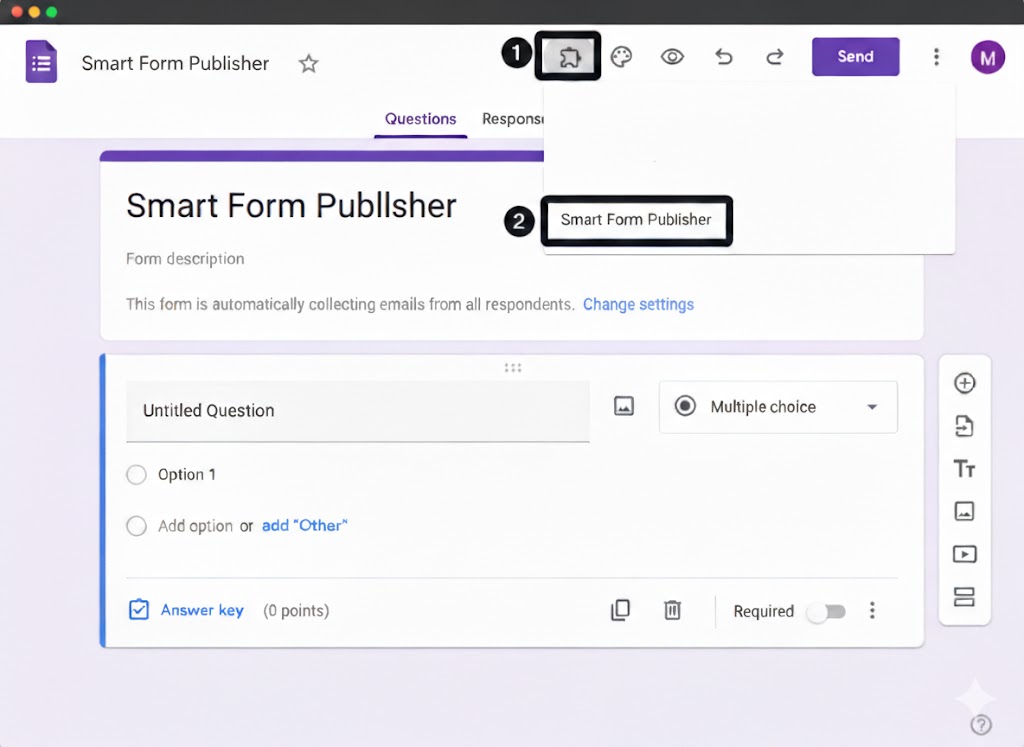
Once installation is complete, open any Google Form. Click the puzzle icon in the top bar, choose Smart Form Publisher, and then click Get Started to open the sidebar.
Start Using the Add-on
Congratulations! 🎉 Smart Form Publisher is now installed and ready to use. You can start configuring your templates and automating certificates or personalized files right away.
- Generate certificates and PDFs automatically
- Merge form responses into Google Docs or Slides
- Automatically email results to respondents
Important: Account Switching Issues
As noted in our installation video, if you are logged into multiple Google Accounts in the same browser session (for example, a personal Gmail account and a work Google Workspace™ account), Google may prevent the add-on sidebar from loading correctly.
To fix this:
- Log out of all Google accounts, then sign back in using only the account you want to use with Smart Form Publisher.
- Alternatively, open your Google Form™ in an Incognito or Private browser window and sign in there.
Verification Check
After clicking “Get Started”, a sidebar should appear on the right side of your Google Form™ window. If you see the Welcome screen inside that sidebar, the installation and authorization were completed successfully.
Video Walkthrough
Prefer to see the installation in action? Our step-by-step installation video walks you through the entire process.
- Finding Smart Form Publisher in the Google Workspace Marketplace™
- The exact authorization screens you will encounter
- What to do if the add-on doesn’t appear in your menu
Next Steps
Ready to get started? Install the add-on now to begin your automation journey.
Getting Started