
Opening the Add-on Sidebar
Once your form and template are ready, it’s time to connect everything using the Smart Form Publisher add-on. The sidebar interface allows you to map placeholders, choose templates, and automate file generation and delivery.
To Begin Configuration:
- Open your Google Form.
- Navigate to Extensions → Smart Form Publisher → Open.
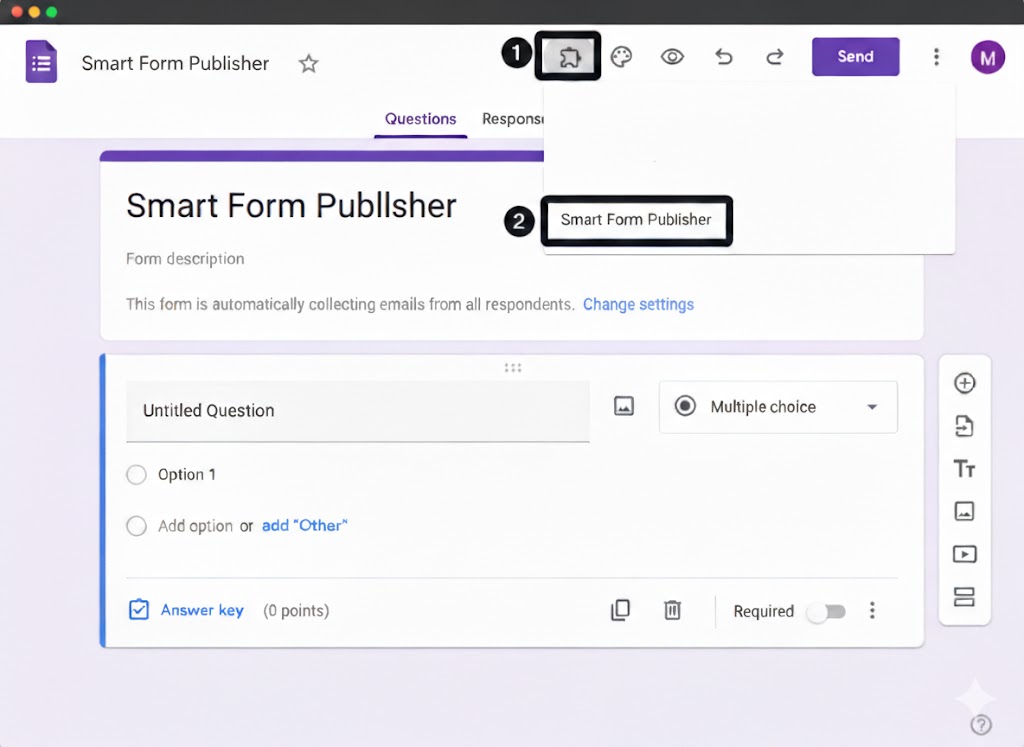
Alternative Navigation: The Puzzle Icon 🧩
While the Extensions menu is the standard way to access add-ons, Google Forms also provides a quick-access shortcut. As demonstrated in our Video Quick-Start Guide:
- Look for the Puzzle Piece icon in the top-right toolbar of your Google Form (next to the Palette and Preview icons).
- Click the icon to see a list of all installed add-ons.
- Select Smart Form Publisher and click Get Started.
What to Expect: The Sidebar Interface
Once the sidebar slides open on the right side of your screen, you’ll see several key sections designed to guide you through a successful setup:
- Project Dashboard: Your home screen where you can view an active configuration or start a new one.
- Template Selection: A dedicated option to browse Google Drive and select your Docs, Slides, or Sheets template.
- Merge Mapping Area: Displays all
{{tags}}found in your template and lets you map them to form questions. - Email & Delivery Settings: Define recipients and customize the email message using simple toggles.
- Automation Controls: Enable On Form Submit automation or run manual Bulk Generations.
Initializing the Add-on (First-Time Use)
The very first time you open the sidebar for a new form, Smart Form Publisher performs a brief setup process behind the scenes:
- Authorization Check: You may see a permission prompt to “Run as an Add-on.” This allows the sidebar to read your form questions for mapping.
- Working… Indicator: A small loading message may appear. Keep the sidebar open until initialization completes.
Pro Tips for a Smooth Experience ✨
- Multiple Account Warning: If you are logged into multiple Google accounts in the same browser, the sidebar may load as a blank screen.
- Incognito Mode: Opening the form in a Chrome Incognito window can bypass conflicting extensions or cached data.
- Browser Zoom: Set zoom to 100%.
- Third-Party Cookies: Ensure third-party cookies are enabled or *.google.com is whitelisted.
Visual Guide
If you’re having trouble locating the menu or sidebar icons, refer to the first video in our playlist: “Navigating the Smart Form Publisher UI”. 🎥
You’re now ready to start linking your form with a document template and configuring automated publishing.