
Understanding the Workflow
Smart Form Publisher automates document creation by connecting your Google Form responses with templates in Docs™, Slides™, or Sheets™ — generating personalized outputs instantly.
Workflow Overview
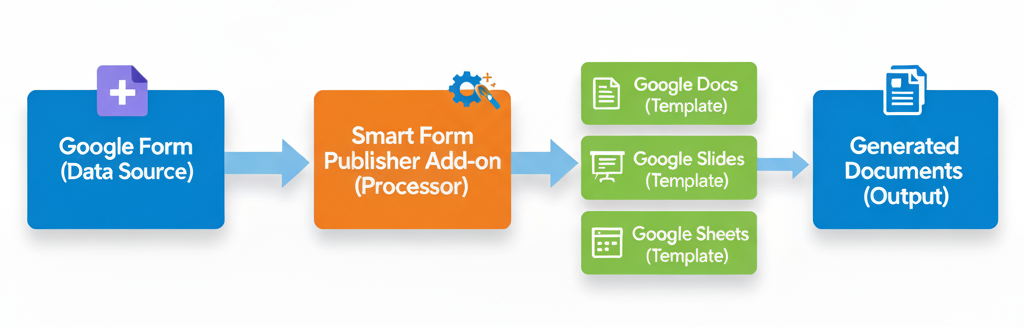
The process follows this sequence:
Component Breakdown
1. Google Form (Data Source)
Users submit responses like name, email, or department. These become inputs for document generation.
- Design forms with relevant fields
- Responses automatically stored in a linked Sheet
2. Smart Form Publisher Add-on (Processor)
The engine connecting your form responses to templates.
- Reads form responses
- Maps data to placeholders
- Applies logic and automation rules
- Handles generation and email delivery
3. Google Docs/Slides/Sheets (Template)
The layout layer where dynamic content is inserted.
- Create your design or use templates
- Add placeholders like
{{Name}}or{{Department}} - Supports text, images, and QR codes
4. Generated Documents (Output)
Personalized documents are automatically created and shared.
- Saved in Google Drive™ as PDFs or images
- Links logged in the response sheet
- Emails with attachments sent automatically
Visual Workflow
Here’s a visual overview of how the entire system operates:
The Role of the Linked Google Sheet
A critical but often overlooked part of the Smart Form Publisher workflow is the linked Google Sheet™. When a form is submitted, the add-on doesn’t just generate a document — it logs the entire publishing event for visibility and control.
- The Tracking Column — A dedicated column is automatically created to store the direct URL of the generated PDF.
- Status Logs — If an email fails to send or a document is skipped due to a logic rule, the status is recorded here for easy troubleshooting.
- Data Persistence — Because all data lives in the sheet, you can re-generate documents at any time without asking respondents to resubmit the form.
Workflow Logic: Conditional Generation
As demonstrated in our advanced workflow videos, Smart Form Publisher allows you to insert logical filters into your automation flow to control when documents are generated.
- Generate a Certificate of Completion only if the respondent’s quiz score is 80% or higher.
- Send a Sales Invoice only when the “Payment Received” field is marked as “Yes”.
Real-World Workflow Examples
Education
- Form Submit (Quiz)
- → Processor (Check Score)
- → Slide Template (Certificate)
- → Output (Email PDF to Student)
Business
- Form Submit (Order)
- → Processor (Calculate Total)
- → Sheet Template (Invoice)
- → Output (Save to Drive & Email Customer)
HR
- Form Submit (Leave Request)
- → Processor (Mapping)
- → Doc Template (Request Form)
- → Output (Shared with Manager for Signature)
💡 Tip: You can fully customize each stage — from form questions to template design to email delivery.
By understanding each part of the workflow, you’ll be better equipped to customize and automate your document generation process using Smart Form Publisher.